
 Jade Mcgee
A good home office does three jobs at once: it keeps you comfortable for long stretches, it looks professional on camera, and it helps you focus. You do not need a spare room or a designer budget to get there. What you do need is a plan for layout, light, sound and storage that fits the way you actually work.
Set the purpose and choose the spot
Decide what the space must do most days. If calls dominate, give priority to an uncluttered backdrop and soft acoustics. If your work is deep-focus writing, place the desk where interruptions are least likely and visual distractions are low. In a small flat, a slim desk against a wall or window works well. For meetings, turn your chair ninety degrees so your background stays calm and consistent.
Make the camera view part of your CV
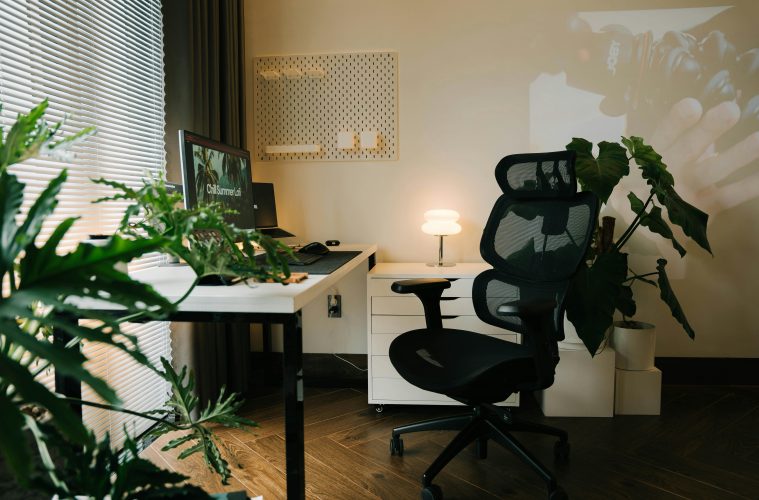
Your background reads as part of your professional image. Keep it simple and neutral with a plain wall, a tidy bookcase, one framed print or a plant. Avoid beds, TVs and laundry in frame. Lift the webcam to just above eye level and sit about an arm’s length from the lens. Natural light in front of you flatters most faces. After dark, a small key light angled slightly to one side prevents glare.
Light in layers for comfort and clarity
One overhead fitting tires the eyes and washes you out on calls. Use three sources: a desk task lamp, a soft ambient glow behind the monitor or on a shelf, and any natural light you can borrow. Warm to neutral bulbs around 3000 to 4000 K keep skin tones natural on video and reduce strain.
Fix ergonomics once, then forget them
Comfort drives productivity. Aim for the screen top around eyebrow height, shoulders relaxed and forearms parallel to the desk. If your chair is basic, add a thin seat cushion and a small lumbar pillow. A sturdy box serves as a footrest in a pinch. A separate keyboard and mouse let you raise the laptop without craning your neck.
Hide cables, calm your head
Visual mess creates mental noise. Run leads down a desk leg, gather them with Velcro ties and mount a small power strip underneath so only one cable drops to the wall. Park the printer on a low shelf. Keep only daily-use devices within reach and corral spares in a labelled tray so they do not creep into shot.
Store smart, not more
Think vertical to keep the worktop clear. Floating shelves above the desk hold reference books and boxes. A shallow pedestal or trolley stows paper, stationery and tech. Use closed storage for anything scruffy and open storage for what you are happy to see. In a shared room, a closed cabinet doubles as a visual boundary so work does not spill into the evening.
Choose colour and soften sound
Mid-tone neutrals and soft greens are easy to live with and read well on camera. Add life with texture rather than loud accents. A rug, curtains, an upholstered chair or a pinboard will cut echo and make calls clearer. In very hard-sounding rooms, place a felt panel or cork board behind the screen and add a plant nearby to break up reflections.
Scale the furniture to the room
In compact homes, a narrow desk with rounded corners feels lighter and keeps circulation easy. Shallow shelves free floor space. If you must work from a bedroom, set a low bookcase or folding screen behind the chair so the bed never appears on camera. In larger rooms, float the desk with space to walk around it and add a second perch for reading or planning so you can change posture without losing focus.
Give everything a home and reset daily
Keep daily tools on the desk only: laptop, lamp, notebook, pen pot, water. Weekly items live in the top drawer. Project material belongs on a shelf. Clear the surface at day’s end in under two minutes. A small catch-all tray for keys, lip balm and earbuds stops the slow creep that reads as unfocused on video.
Build cues that support routine
A small plant lifts mood and softens the frame. A diffuser with one calm scent can mark the start of the day. A wall clock reduces phone checks. These minor cues turn a corner of the house into a place you trust to help you work.
A quick run-through before the next call
Check that the background is neutral and tidy, the camera is at or just above eye level, and the light is in front of you rather than behind. Clear the desk of extras and hide spare screens. Set your chair so shoulders are relaxed and feet supported. Close the door or mark a boundary and silence notifications.
The takeaway
The best home offices look effortless because every choice pulls in the same direction: clear view, kind light, quiet sound, a comfortable body and tools within reach. Design for how you work on your best days, then make it easy to maintain on your busiest ones.
ALSO SEE:
Featured Image: Pexels
This article was originally written by Jade McGee for Woman&Home South Africa.
